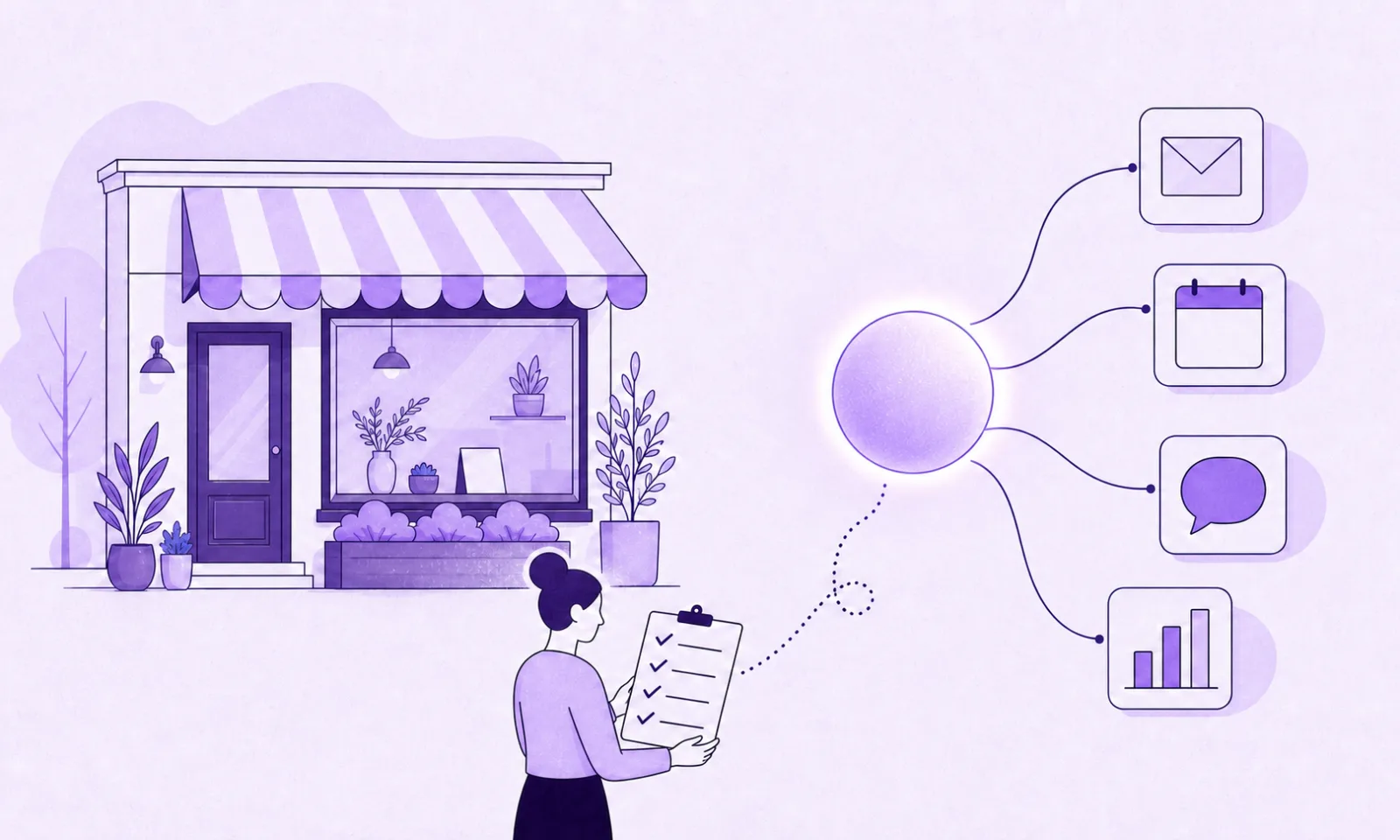

An AI agent is software that completes a task for your business from start to finish. It can read an incoming inquiry, draft the reply, book the appointment, and update your CRM, without a person driving each step. A chatbot answers questions. An agent gets the work done.
I am the founder of Credminds, and building agents like this for clients is a large part of what we do. Most of what ranks for this topic is written by companies selling an agent platform, so every article reaches the same conclusion: use ours. We do not sell a platform, and we spend a surprising number of discovery calls telling owners they do not need an agent yet.
This post is the honest version of that conversation.
What an AI agent actually is (and what it is not)
Three different things get called “AI” in almost every conversation we have with small business owners: chatbots, automation scripts, and agents. The differences matter, because they fail in different ways.
| Waits for | What it does | Example | |
|---|---|---|---|
| Chatbot | A question | Replies with text | Answers “what are your opening hours?” |
| Automation script | A trigger | Runs the same fixed steps every time | Form submitted, row added to a spreadsheet |
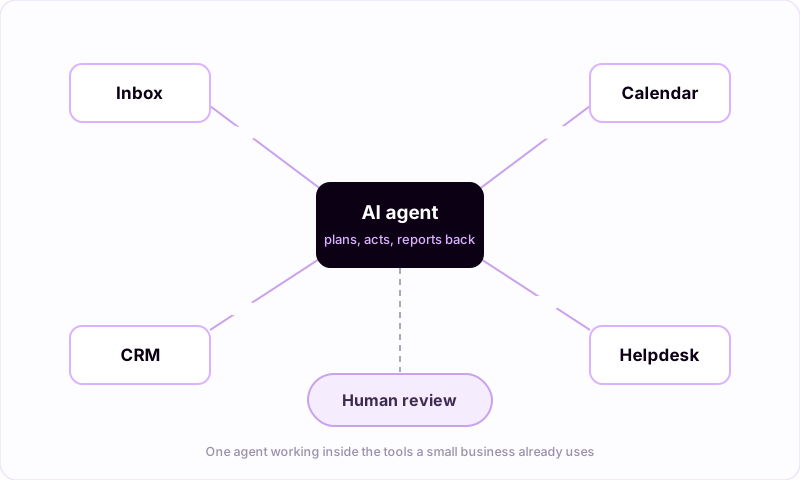
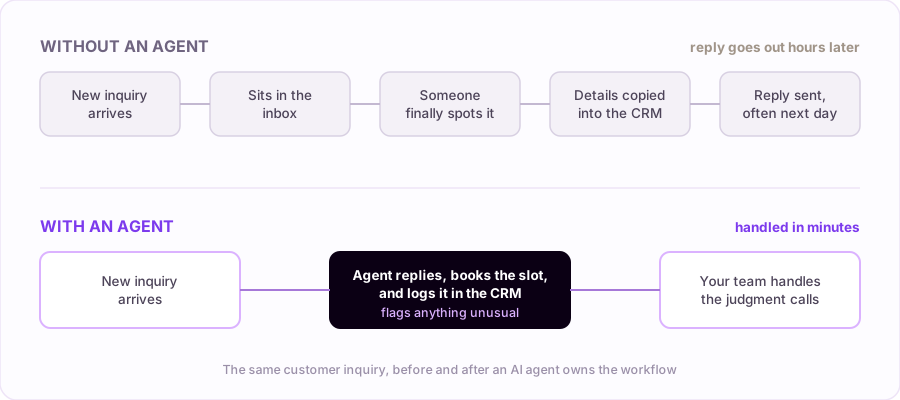
| AI agent | A goal | Plans the steps, uses your tools, adapts to what it finds | Reads an inquiry, answers it, books the call, logs it in the CRM |
Under the hood, an agent is a language model wrapped in three things: access to your tools, clear instructions about the job, and guardrails that define what it must never do on its own. That last part matters more than which model you pick. A well-built agent knows when a case is unusual and hands it to a human, visibly, instead of guessing.
If you remember one distinction from this article, make it this: chatbots talk, scripts repeat, agents complete.
The use cases that actually work today
Owners usually come to us asking about something ambitious, like an agent that “runs operations.” The agents that quietly succeed are humbler than that. They take over work that is frequent, repetitive, and rule-based, which in a small business means:
- Customer questions. Most businesses answer the same twenty questions all day. An agent answers those instantly, in your tone, from your real policies, and hands the rest to a person.
- Scheduling and reminders. Booking, rescheduling, and reminder messages without the email ping-pong. Fewer no-shows is usually the first measurable change.
- Lead follow-up. When we ask owners what happens to an inquiry that arrives at 8pm, the honest answer is usually “nothing until morning.” An agent replies in minutes, while the interest is still warm, and asks the qualifying questions you would ask.
- Between-systems busywork. Copying order details from email into a spreadsheet, updating the CRM after a call, syncing a form into your job tracker. Nobody was hired to do this, yet someone does it daily. (This category often does not need a full agent; see our AI automation services.)
- Weekly reporting. Pulling numbers out of three tools into one plain-language summary every Monday morning, so decisions stop waiting on whoever knows the spreadsheets.
Notice what this list is not: it is not strategy, selling, or anything a customer would feel strange about if they knew a machine did it. That is deliberate. The pattern behind every agent that survives past month one is the same: the task happens often, the rules are known, and being fast and consistent beats being clever.
Wondering which of these fits your business? Tell us how the work happens today and we will tell you honestly what an agent can and cannot take over.
Talk it through with usOff-the-shelf or custom: which is the best AI agent for a small business?
Here is the advice we give on calls, even though we build custom agents for a living: try an established product first if one already fits your workflow.
If your need matches a category that products serve well, an off-the-shelf agent is the fastest path. Support agents built into helpdesks (Intercom’s Fin, for example), admin assistants like Lindy, and workflow connectors like Zapier or n8n cover a lot of ground for a typical small business, and they come with someone else maintaining them.
A custom agent starts to make sense in three situations we see over and over:
- The workflow crosses several systems in a shape no product anticipated. Your process touches the inbox, a legacy job tracker, a supplier portal, and a WhatsApp thread. No SaaS tool models that. Custom AI agent development exists for exactly this.
- The process is your edge. If the way you qualify leads or handle orders is part of why customers pick you, forcing it into a generic tool sands off the thing that made it work.
- The data cannot leave your hands. Some businesses handle information they are not willing to route through a third-party AI product. A self-hosted setup keeps the model and the data on infrastructure you control.
A fair rule of thumb: when an off-the-shelf tool covers the whole job, use it. When it covers 70% and the remaining 30% is the actual pain, that gap is what custom work is for.
A real example
One of our projects, ShopiVibes, is an AI loyalty and marketing platform for local retailers. The problem it exists for is one every shop owner recognizes: regulars do not announce they are leaving. They just come in less often, and by the time anyone notices, they are gone.
ShopiVibes watches purchase patterns and predicts which customers are likely to churn before it happens. Then it runs the win-back and loyalty campaigns automatically, the kind of work that otherwise waits for someone to find an afternoon for a spreadsheet and a mailing list.
What changed for the retailers using it is the part worth copying: the repetitive detection-and-campaign work runs on its own, and the humans spend their attention on the customers the system flags, not on assembling lists. That division of labor, machine handles the pattern, person handles the relationship, is what a good agent setup looks like in any industry.
When an AI agent is the wrong answer
We turn down agent projects more often than you might expect. The common reasons:
- The task needs judgment your team still argues about. If two employees would handle the same case differently and both think they are right, an agent will just automate the argument. Settle the process first.
- The process changes every week. Agents thrive on stable rules. If you are still figuring out how the work should be done, automating it locks in the wrong version.
- Nothing is written down. An agent needs your policies, tone, and edge cases as material. “It’s all in my head” is fixable, but fix it before the build, not during.
- The volume is too small. If a task happens twice a week, the honest advice is to keep doing it by hand and spend your energy elsewhere.
None of these mean never. They mean not yet, and knowing the difference saves months.
How to tell if your business is ready
Run the workflow you have in mind through this checklist:
- The task happens daily, or many times a day.
- It follows the same steps each time, and those steps are written down, or at least everyone agrees on them.
- The tools involved are reachable: email, calendar, CRM, helpdesk, anything with an API.
- You can say what “done correctly” looks like, specifically enough to check.
- Someone on your team will own reviewing the agent’s work for the first few weeks.
Four or five checks means you have a real candidate. Two or three means pick a different workflow, or tighten this one first. The businesses that get the most out of AI agents for small business operations are rarely the most technical ones. They are the ones with the clearest processes.
Final thoughts
The gap between what AI agents promise and what they deliver closes fast when you aim them at the right work. Boring, frequent, rule-based tasks are where they pay off, and one workflow handled end to end beats five handled halfway.
Start small, keep a human in the loop, and measure the before and after. If the first agent works, you will know exactly where the second one should go.
If you are weighing whether to build this yourself, buy a tool, or bring in help, we wrote a companion guide on hiring an AI consultant for a small business: what they actually do, when you do not need one, and the questions that separate builders from deck shops. If the workflow you care about is the phone that keeps ringing out, start with our guide to AI receptionists for small businesses. And if what you need is the busywork between systems handled rather than a full agent, our guide to AI automation for small business covers what to automate first.